
The Ultimate Guide to Beginner-Friendly AI Tools That Will Reclaim Your Time
Artificial intelligence has rapidly transitioned from a futuristic concept to a practical, everyday utility. For many professionals and individuals, the initial perception of AI involved complex coding, steep learning curves, and an intimidating barrier to entry. However, the landscape has evolved significantly. Today, a new generation of AI tools has emerged, specifically designed with the non-technical user in mind. These platforms prioritize intuitive interfaces, natural language processing, and seamless integration into existing workflows, transforming the way we manage tasks, create content, and organize our time.

Figure 1: A visual overview of how AI tools are transforming productivity in 2026.
This article explores a curated selection of beginner-friendly AI tools that are proven to enhance productivity and save valuable hours each week. By categorizing these tools based on their primary functions—ranging from writing and communication to visual design and task management—we aim to provide a comprehensive guide for anyone looking to harness the power of AI without needing a background in computer science.
The Paradigm Shift: AI as a Personal Assistant
The core appeal of modern AI tools lies in their ability to act as intelligent personal assistants. Rather than replacing human creativity or decision-making, these platforms augment our capabilities by automating repetitive tasks, providing instant access to information, and offering intelligent suggestions. This shift democratizes productivity, allowing individuals across various professions to achieve more in less time.
The defining characteristic of a beginner-friendly AI tool is its accessibility. Users can interact with these systems using conversational language, simply stating what they need rather than inputting complex commands. This intuitive approach significantly lowers the barrier to entry, encouraging widespread adoption and experimentation.
Revolutionizing Writing and Communication
Effective communication is the cornerstone of professional success, yet drafting emails, reports, and articles can be incredibly time-consuming. AI tools designed for writing and communication alleviate this burden by offering real-time assistance and intelligent content generation. These tools do more than just fix typos; they act as a sophisticated editor and a creative partner, helping you refine your voice and express your ideas more clearly.
Elevating Content Quality with Intelligent Assistants
Platforms like Grammarly have set the standard for AI-assisted writing. Moving beyond basic spell-checking, these tools analyze context, tone, and clarity, offering suggestions to improve the overall impact of the text. For beginners, this provides an immediate boost in confidence, ensuring that communications are professional and articulate. The integration of these tools into web browsers and word processors means that assistance is always available, seamlessly enhancing the writing process without requiring a separate application.
Imagine you are drafting a sensitive email to a client. You might be worried about sounding too aggressive or, conversely, too passive. An AI writing assistant can flag these tonal nuances, suggesting alternative phrasing that better aligns with your intended message. This level of support is invaluable for non-native speakers or anyone who feels less than confident in their writing abilities. It ensures that your message is received as intended, reducing the likelihood of misunderstandings and the time-consuming back-and-forth that often follows.
Conversational AI for Drafting and Brainstorming
The advent of conversational AI, exemplified by platforms such as ChatGPT and Claude, has revolutionized content creation. These tools excel at generating initial drafts, brainstorming ideas, and summarizing complex information. A user can simply prompt the AI with a topic or a set of key points, and the system will produce a coherent and structured response within seconds.
For instance, an individual tasked with writing a marketing email can instruct the AI to draft a persuasive message targeting a specific demographic. The resulting text serves as a strong foundation, requiring only minor edits and personalization before sending. This capability drastically reduces the time spent staring at a blank page, allowing users to focus on refining the message rather than generating it from scratch.
Beyond drafting, these tools are exceptional brainstorming partners. If you're stuck on a creative project, you can ask the AI for "ten unique ideas for a summer marketing campaign" or "five ways to improve customer retention." The speed at which it generates diverse ideas can spark your own creativity, leading to breakthroughs that might have taken hours of solo contemplation. This collaborative aspect of AI is one of its most powerful time-saving features, acting as a catalyst for human innovation.
Mastering the Art of the Prompt
To truly unlock the potential of conversational AI, beginners must learn the basics of "prompt engineering." This sounds technical, but it’s actually quite simple. It’s about being specific and providing context. Instead of asking, "Write a blog post about AI," try, "Write a 500-word blog post for beginners about how AI can save time in the workplace, using a friendly and encouraging tone."
The more information you give the AI—who the audience is, what the goal is, and any specific points you want to cover—the better the output will be. This reduces the time spent on revisions and ensures the AI's work is closely aligned with your needs. Many beginners find that once they master this simple skill, the utility of AI tools multiplies exponentially.

Transforming Visual Design and Presentations

Figure 2: AI-powered tools are revolutionizing creative workflows for non-designers.
Creating compelling visual content often requires specialized skills and expensive software. However, AI-powered design tools have democratized this process, enabling anyone to produce professional-quality graphics and presentations with minimal effort. This shift is particularly impactful for small business owners and freelancers who may not have the budget for a full-time creative team.
Intuitive Graphic Design for Everyone
Platforms like Canva have integrated sophisticated AI features that simplify the design process. Users can generate images from text descriptions, automatically remove backgrounds from photos, and apply intelligent layout suggestions. These tools are designed to be highly intuitive, utilizing drag-and-drop interfaces and pre-designed templates that require no prior design experience.
Consider the "Magic Edit" feature in Canva, which allows you to describe a change you want to make to an image—like "change the blue shirt to red" or "add a coffee cup to the table"—and the AI handles the complex editing for you. This replaces what would have been a complex task in professional software with a simple text command. This accessibility empowers individuals to create engaging social media posts, marketing materials, and internal communications without relying on a dedicated graphic designer. The time saved on visual creation can be redirected toward strategic planning and execution.
Automated Presentation Generation: From Idea to Deck in Minutes
Building slide decks is a notoriously time-consuming task, often involving hours of formatting and layout adjustments. AI tools like Gamma address this challenge by automating the presentation creation process. Users simply provide a topic or an outline, and the AI generates a complete slide deck, complete with relevant images, structured content, and professional formatting.
For example, if you need to present a project update to your team, you can input your key milestones and results into Gamma. The AI will then organize this information into a visually appealing sequence of slides, choosing appropriate themes and layouts. You can then refine the content, but the heavy lifting of design and structure is already done. This capability is particularly beneficial for professionals who frequently present information to clients or colleagues. By eliminating the manual labor associated with slide creation, individuals can focus on delivering a compelling narrative and engaging with their audience.
The Rise of AI Image Generation
A significant breakthrough in the creative space is the emergence of AI image generators like DALL-E 3 (integrated into ChatGPT Plus) and Midjourney. These tools allow you to create completely original images from a text prompt. For a blog writer, this means no more searching for hours for the perfect stock photo. You can simply describe the image you need, and the AI will generate it for you.
This technology is still evolving, but even in its current state, it provides an incredible resource for unique visual content. For beginners, it’s as simple as describing a scene: "A futuristic office with diverse people working alongside friendly robots, bright and airy style." The ability to generate custom visuals on demand is a massive time-saver and a boost for creative expression.

Streamlining Research and Information Retrieval
The internet provides access to an unprecedented amount of information, but finding accurate and relevant answers can be a daunting task. AI-powered search engines and research assistants are transforming how we navigate this vast sea of data, making the process of learning and fact-finding much more efficient.
Intelligent Search and Synthesis: Moving Beyond the Search Bar
Traditional search engines often require users to sift through multiple web pages to find the information they need. You might spend twenty minutes clicking through links, only to find that none of them quite answer your specific question. In contrast, AI search engines like Perplexity provide direct answers synthesized from various credible sources. These platforms understand the context of a query and deliver a concise, comprehensive response, complete with citations for verification.
Imagine you're researching the latest trends in sustainable architecture. Instead of searching for "sustainable architecture trends 2026" and reading ten different articles, you can ask Perplexity, "What are the top three most influential trends in sustainable architecture for 2026, and who are the key firms leading these movements?" The AI will scan the web, summarize the findings, and provide you with a structured answer, complete with links to the original sources.
This approach significantly accelerates the research process, allowing users to quickly grasp complex topics and gather relevant data without spending hours reading through articles. For students, researchers, and professionals alike, this capability represents a substantial time-saving advantage. It transforms the search process from a scavenger hunt into a conversation with a knowledgeable researcher.
AI for Learning and Skill Development
Beyond simple information retrieval, AI is becoming a powerful tool for self-education. Platforms like Khan Academy's Khanmigo act as personal tutors, guiding students through complex subjects by asking questions and providing hints rather than just giving the answers. This personalized approach to learning is incredibly efficient, as it adapts to the individual's pace and level of understanding.
For professionals looking to upskill, AI can summarize long research papers, explain technical concepts in simple terms, or even help practice a new language. The ability to quickly digest and understand new information is a critical skill in today's fast-paced world, and AI tools are making this more accessible than ever before.

Optimizing Task Management and Organization
Managing schedules, tracking tasks, and organizing information are critical components of productivity. AI tools are increasingly being integrated into these areas, offering intelligent solutions that streamline daily operations and reduce the cognitive load of staying organized.
Automated Meeting Summaries: Focus on the Conversation
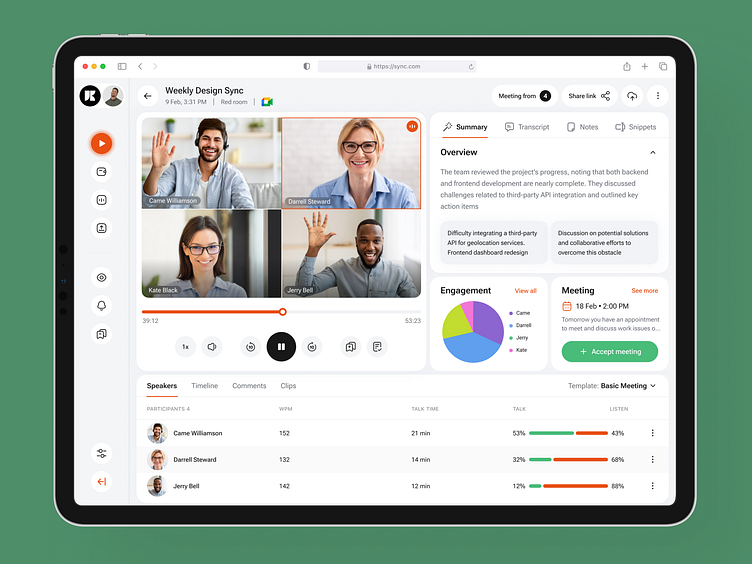
Figure 3: AI assistants can handle meeting transcriptions and summaries, allowing for better engagement.
Meetings are essential for collaboration, but taking notes and tracking action items can be distracting. How many times have you missed a key point because you were busy writing down the previous one? AI meeting assistants, such as Otter.ai and Fireflies.ai, solve this problem by automatically recording, transcribing, and summarizing conversations. These tools identify key decisions, highlight action items, and provide a searchable record of the discussion.
After the meeting, you receive a concise summary that you can share with the team. This ensures that everyone is on the same page and that no critical information is lost. By automating this process, participants can fully engage in the meeting without the burden of manual note-taking. The resulting summaries ensure that everyone is aligned and that important tasks are not overlooked, ultimately saving time and improving team efficiency.
Intelligent Scheduling and Prioritization: Your AI Chief of Staff
Managing a complex calendar can be a full-time job in itself. Between balancing meetings, deep-work sessions, and personal commitments, it’s easy for things to fall through the cracks. AI-powered scheduling tools like Motion act as a digital chief of staff. They analyze your tasks, deadlines, and availability to automatically create an optimized schedule.
These platforms do more than just block out time; they prioritize critical tasks, schedule focused work sessions during your most productive hours, and dynamically adjust your calendar when unexpected events occur. If a meeting runs over or a new urgent task arrives, the AI reshuffles your day to ensure your most important work still gets done. This intelligent approach to time management eliminates the need for manual scheduling and ensures that individuals are focusing their energy on the most important activities. By delegating the organizational heavy lifting to AI, users can reclaim significant portions of their day.
Organizing Your Digital Brain
We are constantly bombarded with information—emails, articles, notes, and messages. AI tools like Notion AI and Mem are designed to help organize this "digital brain." These platforms can automatically tag and categorize your notes, summarize long documents, and even find connections between different pieces of information you've saved.
For a beginner, this means you don't have to spend hours setting up complex filing systems. You can simply save information, and the AI will help you find it when you need it. This reduces the "search time" that often plagues our digital lives, allowing for a more seamless and productive workflow.

Navigating the Ethical and Practical Landscape
As we integrate AI more deeply into our lives, it's important to approach these tools with a balanced perspective. For beginners, understanding the limitations and ethical considerations of AI is just as important as knowing how to use the tools themselves.
The Importance of Human Oversight
One of the most common mistakes beginners make is trusting AI blindly. While AI models are incredibly advanced, they are not infallible. They can occasionally "hallucinate," providing information that sounds plausible but is factually incorrect. Therefore, it is crucial to always review and verify the output of any AI tool, especially when it comes to factual information or sensitive communications.
Think of AI as a highly capable intern. They can do a lot of the heavy lifting and provide great drafts, but the final sign-off should always come from you. This human-in-the-loop approach ensures that the quality and accuracy of your work remain high while still benefiting from the time-saving capabilities of AI.
Privacy and Data Security
When using AI tools, you are often providing them with data—your writing, your schedule, or your company's information. It is essential to choose reputable platforms and understand their privacy policies. Most beginner-friendly tools have robust security measures, but it's always a good practice to avoid inputting highly sensitive or confidential information into public AI models.
Many tools now offer "private" or "enterprise" versions that provide enhanced data protection. For most individual users, the standard versions of tools like ChatGPT or Grammarly are perfectly safe for everyday tasks, but staying informed about how your data is used is a key part of being a responsible AI user.
Overcoming the Initial Learning Curve: A Step-by-Step Approach
While the tools discussed in this article are designed to be beginner-friendly, adopting new technology always involves a slight learning curve. The key to successful integration is to start small and focus on specific pain points.
Step 1: Identify Your Biggest Time-Sinks
Rather than attempting to overhaul an entire workflow at once, start by identifying one or two tasks that consume a disproportionate amount of time or cause the most frustration. Is it drafting repetitive emails? Is it formatting slide decks? Is it trying to summarize long reports? Pinpointing these "low-hanging fruit" will give you the quickest return on your investment of time.
Step 2: Choose One Tool and Master It
Once you've identified a pain point, select the corresponding AI tool and spend some time getting to know it. Watch a few tutorial videos, experiment with different prompts, and see how it fits into your existing routine. For example, if you choose ChatGPT for drafting, spend a week using it for all your initial email and report drafts. You'll quickly find a rhythm that works for you.
Step 3: Gradually Expand Your Toolkit
As you become comfortable with your first AI tool and start seeing the time-saving benefits, you can gradually explore other solutions. Maybe you add Grammarly to polish those drafts, or you start using Otter.ai for your meetings. By taking an incremental approach, you avoid feeling overwhelmed and ensure that each new tool is actually adding value to your life.
Step 4: Stay Curious and Keep Experimenting
The world of AI is moving incredibly fast. New features and tools are being released almost daily. To stay ahead, maintain a sense of curiosity. Follow a few AI-focused blogs or social media accounts, and don't be afraid to try out new things. The most successful AI users are those who are willing to experiment and adapt as the technology evolves.
Conclusion
The integration of artificial intelligence into everyday tools represents a significant leap forward in personal and professional productivity. The platforms highlighted in this article demonstrate that AI is no longer an exclusive domain for technical experts; it is an accessible, practical resource that can save significant time and effort.
By embracing these beginner-friendly AI tools, individuals can automate repetitive tasks, enhance the quality of their work, and reclaim hours of their week. As these technologies continue to evolve, their potential to streamline workflows and empower users will only grow, making AI an indispensable component of the modern toolkit. The future of productivity is not about working harder, but rather working smarter with the assistance of intelligent technology.